










Applying to 30 jobs and hearing back from only two? Hindi ka nag-iisa. When your application looks too similar to everyone else’s, it can be difficult to stand out. The right AI tools for job seekers in the Philippines can help you research companies, tailor your resume, prepare for interviews, and keep track of applications.
The catch: AI works best when you use it for the right task. Below is a five-stage workflow featuring accessible tools, including free options, and practical advice on how to use them without making your application sound artificial.

AI-assisted applications are now common, especially for resumes and cover letters. According to Chiqui Milag, Director of Talent Acquisition at Jobs360, the candidates who stand out use AI to improve clarity and structure, but they still show real experience, real accomplishments, and their own voice.
Stage 1: Research the company and role with an AI chat assistant
Tools: ChatGPT, Google Gemini, Claude, or Microsoft Copilot (all offer free access, subject to usage limits).
Before applying, understand what the company does, what the position involves, and which qualifications the employer prioritises. An AI chat assistant can help organise this research and identify important details in a job posting.
Try this prompt:
“I’m applying for an Accounts Payable Associate role at [company] in Clark, Pampanga. Summarise what the company does and list five skills this role likely requires, based on this job post: [paste job post]. Separate information stated in the job post from your assumptions.”
Two rules:
- Verify the facts. AI tools can produce outdated or inaccurate information. Confirm important details through the company’s official website or LinkedIn page.
- Use the output as a checklist. Identify which skills you can demonstrate through your actual work experience and which ones you need to prepare for during the interview.
Stage 2: Tailor your resume with an LLM, then format it in Canva
Tools: ChatGPT, Gemini, Claude, or Copilot + Canva (free plan).
A generic resume may not communicate why you’re qualified for a particular position. An AI assistant can help you tailor your experience to the requirements of each job without changing the facts.
Paste your current resume and the job posting, then ask:
“Rewrite my work experience bullet points to better match this job posting. Use only information from my resume. Start each bullet with an action verb and include measurable results only where I have provided supporting numbers. Do not invent qualifications or achievements.”
That last instruction matters. AI can produce convincing but inaccurate achievements, responsibilities, and job titles. Always check the output before using it.
Once your content is ready, Canva offers free resume templates you can customise. However, prioritise readability over elaborate designs. Use a simple, single-column layout, standard section headings, and selectable text. Some applicant tracking systems (ATS) struggle with tables, multiple columns, graphics, and text embedded in images, although compatibility varies by system.
For more on resume screening, read how recruiters and AI evaluate your resume.
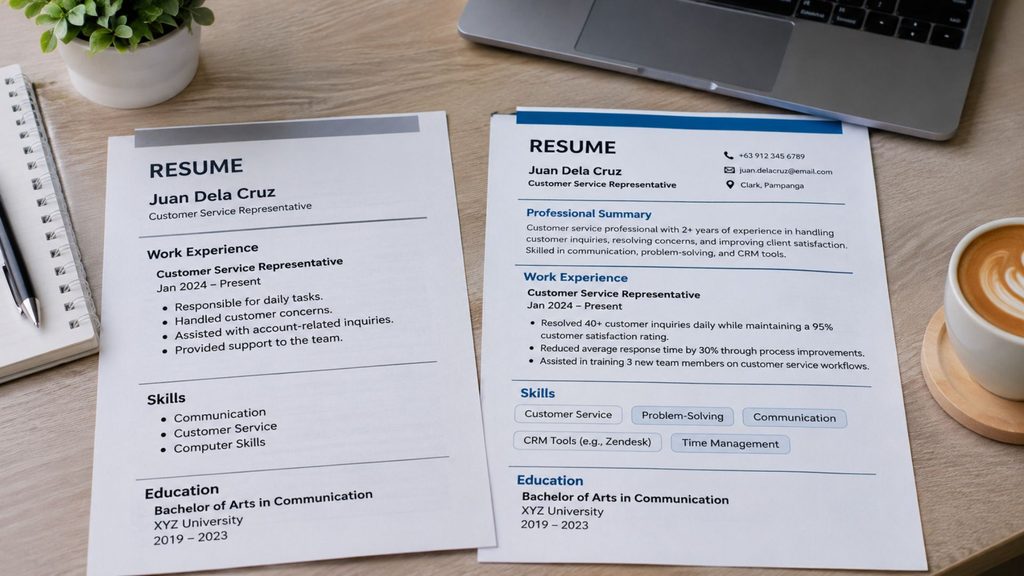
As one of our recruiters mentioned, the most common problem in AI-written resumes is generic content. Phrases like “results-driven professional” or “excellent team player” show up often, but with no specific examples or measurable results behind them. If a line could appear on anyone’s resume, replace it with something only you can claim.
Stage 3: Draft your cover letter with AI, then make it sound like you
Tools: Claude or ChatGPT + Grammarly (free version).
An AI cover letter can give you a starting point, but it still needs your personal input before you send it.
Give the AI assistant three things: the job posting, your tailored resume, and one genuine reason you want the position. That third input helps make your letter more personal. Perhaps you’ve used the company’s product, or you want to work closer to home in Pampanga instead of commuting to Manila.
Then edit the draft:
- Remove phrases you wouldn’t naturally say, such as “I am writing to express my keen interest.”
- Keep it concise. Around 150 to 250 words is a practical target, unless the employer specifies otherwise.
- Check the final version using Grammarly’s free writing suggestions for grammar, spelling, punctuation, and clarity.
Grammarly’s free plan also offers basic tone and conciseness suggestions, while more advanced rewriting features are available on paid plans.
If you’re refreshing your online presence, you can also use AI to help optimise your LinkedIn profile. Just make sure your profile and cover letter don’t read like identical copies.
Stage 4: Rehearse with AI interview practice tools
Tools: ChatGPT voice mode or Google Gemini Live.
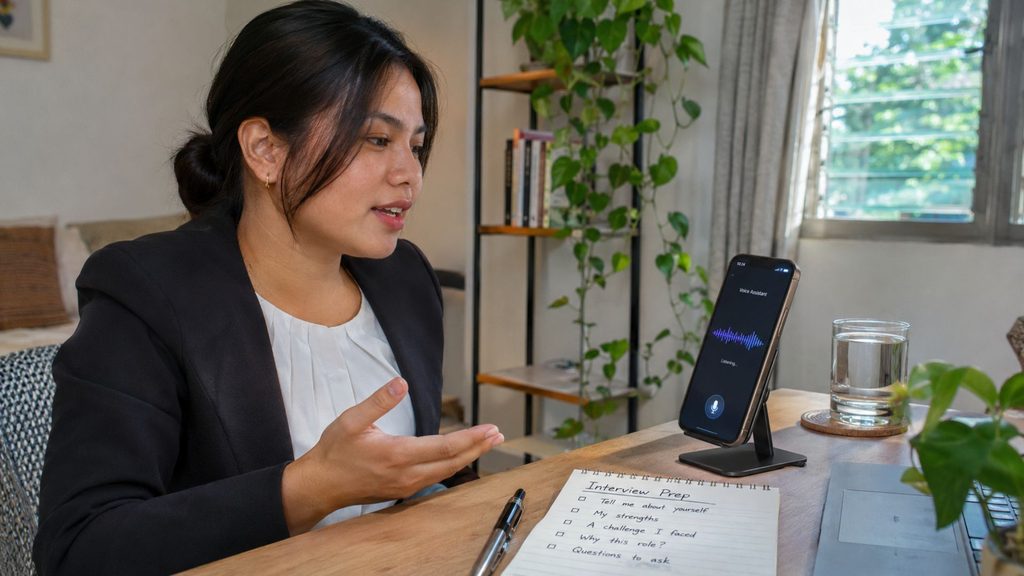
Practising your answers aloud is different from simply reading common interview questions. Voice-based AI assistants let you simulate a conversation, respond verbally, and receive feedback.
Try this prompt:
“Act as a hiring manager for a Customer Service Representative role at a BPO company in Clark. Ask me one interview question at a time. Wait for my answer before asking the next question. After each response, give me one thing I did well and one specific area to improve. Ask follow-up questions when appropriate.”
Practise speaking naturally rather than memorising entire answers. Focus on explaining your experience, giving relevant examples, and answering questions directly.
You can also pair your practice sessions with our guide to job interview questions and answers for fresh graduates.

Stage 5: Follow up and track every application
Tools: ChatGPT, Gemini, or Claude + Google Sheets.
Applying to multiple companies can make it easy to lose track of interviews, application deadlines, and follow-ups.
After an interview, you can ask an AI assistant to draft a short thank-you email. Include something specific you discussed with the interviewer so the message feels personal rather than automated.
If the employer’s expected response period has passed, you can also use AI to draft a polite follow-up. Check the company’s instructions before deciding when to send it.
For tracking, ask an AI assistant to create a simple Google Sheets template with these columns:
- Company name
- Position applied for
- Date applied
- Contact person
- Application status
- Last follow-up
- Next action
Update your tracker after every application or interview. This simple habit can help you stay organised and avoid missing opportunities.
For more advice, read our guide on how to ask for interview feedback.
Using AI tools for job seekers in the Philippines the smart way
AI can speed up your job search, but it cannot replace your actual qualifications, judgement, or ability to communicate.
Keep these reminders in mind:
- Protect your personal information. Avoid entering your TIN, SSS number, full home address, bank details, or other sensitive information into AI chatbots. The Data Privacy Act of 2012 (Republic Act No. 10173) establishes protections for personal information, but you should also review the privacy policies and data controls of the platforms you use.
- Own every word. Anything on your resume or cover letter may come up during an interview. Remove claims you cannot support with real examples.
- Keep your answers human. Use AI to prepare, but let your actual personality and communication skills come through when speaking with recruiters.
Ready to put your toolkit to work? Browse current openings for job hiring in Pampanga on Jobs360 and send your first tailored application today.